UX Research & Testable MVP
Productivity App
(Year)
2026

UX Research. Product design
Survey. AI iterations for testing. Microsoft Clarity Analytics
Goal
The goal was to create a planner prototype and test it with people who struggle to stay focused on completing tasks.
UX Reserch - Quantitative Analysis
Participants
The research included:
A busy engineer who uses a paper notebook and wants to get more tasks done.
A coach with ADHD who uses a paper notebook.
A UX designer who uses Google Calendar, a paper notebook, notes on her phone, and occasionally Notion.
A self-employed professional in the tourism industry who tends to be highly self-reflective.

Results
Iteration 1 — Paper planner
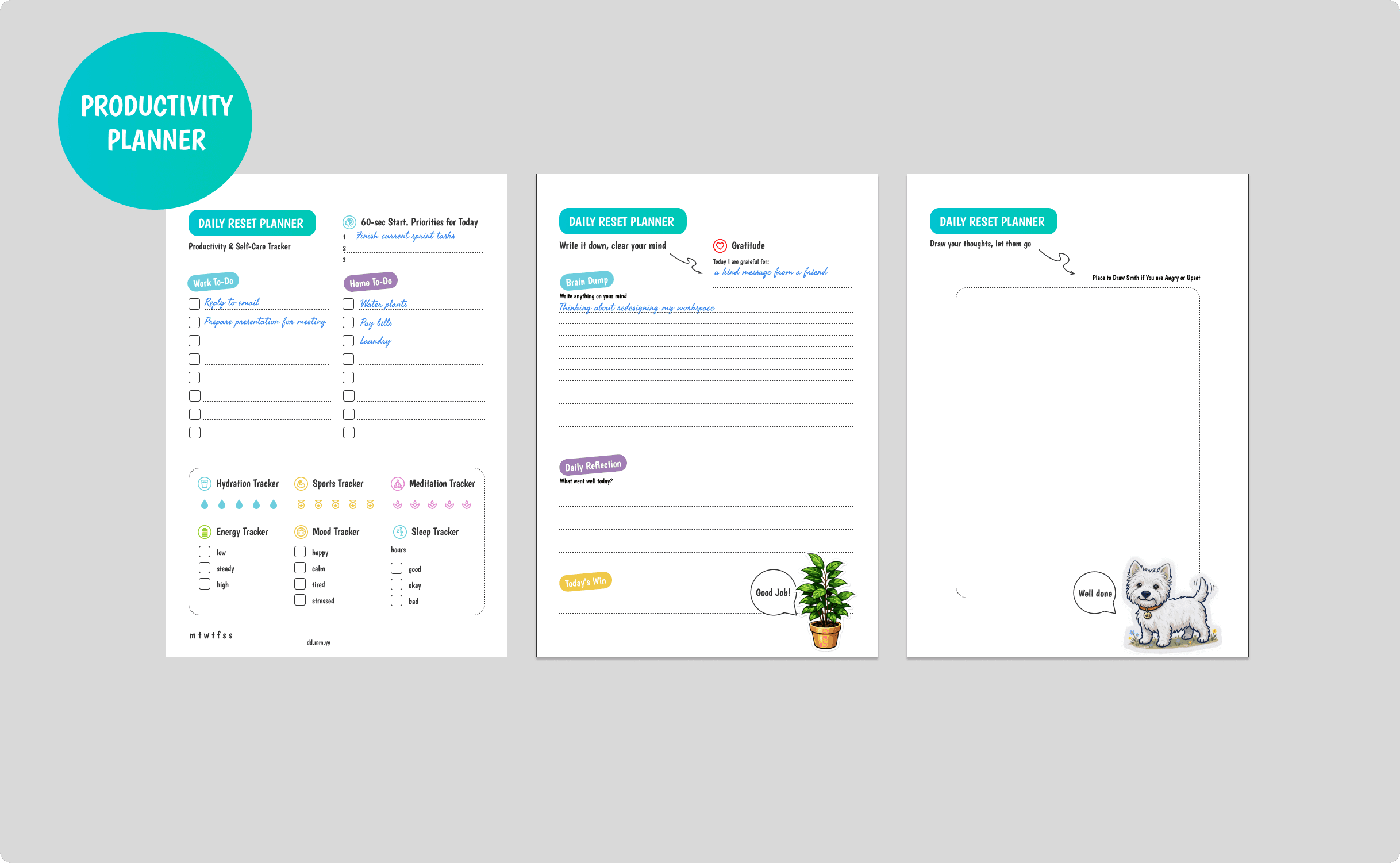
Digital Detox

Dopamine — checklists + reflection.
It can be printed and placed somewhere visible — on a wall, desk, or refrigerator — allowing people to plan their tasks while taking a break from digital devices.
1️⃣ Clear your mind
2️⃣ Start tasks more easily
3️⃣ Focus on the top 1-3 priorities
4️⃣ Track your energy and mood
5️⃣ Get a dopamine boost from checking tasks off
6️⃣ Release emotions and reduce stress
7️⃣ Close the day with reflection
Figma file
A small subset of participants completed tasks faster when using the planner.
However, most were not willing to continue using it because they already had a paper notebook they were familiar with and did not want to replace it.

Iterations 2–3 — MVP
The next iterations were digital MVPs built with Lovable/Claude and deployed on Netlify.
The results were similar. Participants reported that their productivity increased from approximately 40–50% to around 80% while using the planner.
However, most were still unlikely to replace their existing planning system with a new one.
In progress

User Needs & Experience Map
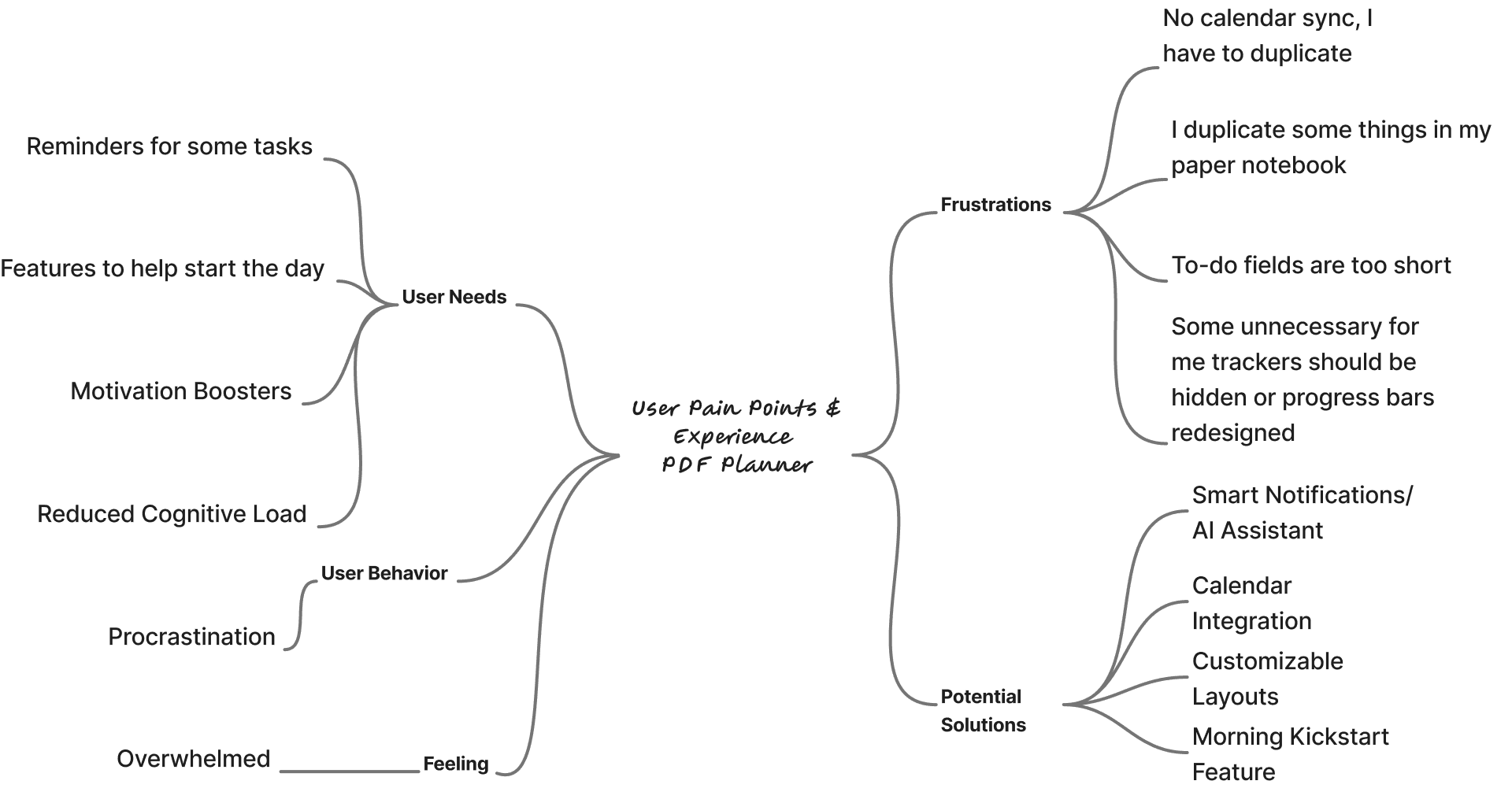
2-3rd versions. Web+mobile
Сreated with Lovable/Claude AI

In it, I added lo-fi music.
Some of the background videos were generated in Kling, and some were taken from free resources.
I would suggest customizing the app by allowing users to move blocks around and keep only the ones they need.


Iteration in Claude
New Features & Improvements
Task Reminders added
Ability to delete tasks
Kanban board implemented
Weekly reports available
Google Calendar potential integration
Voice dictation reminders for task lists
AI burnout prevention reminder: “10 tasks for today? Are you sure?”
Netlify
https://my-focus-planner.netlify.app/
Productivity AI Assistant added
Task button order was redesigned for clearer logic:
Start / In progress / Done,
Sprint / Pause,
Delete task.

Coach. Supportive or Realistic or Strict

Separate tabs:
Sleep tracker and habit tracker
Weekly calendar with tasks (important for psychologists, students, and business professionals)
Kanban board for users who prefer an IT-team–style workflow


Progress tracking for motivation

Smart Reminders

Barriers to Adoption
The planner largely duplicated functionality that participants already had in their existing planning tools.
There was no Google Calendar integration, which meant users could not see everything in one place.
Confirmed Engagement Drivers
Three features consistently encouraged engagement:
A task list that users could physically check off
Tracking the amount of water they drank during the day
Kanban board (for 1 of usrers)
Current Product Insight
At this stage, the planner looks more like a tool that people may use to address a spontaneous, immediate need for focus and productivity, rather than something they would adopt as a long-term planning system.
Long-term retention remains uncertain.
Hypothesis
AI could potentially increase long-term engagement through proactive assistance, reminders, habit formation, or an AI coach (partly implemented).
At the moment, the AI Coach is a separate MVP focused specifically on the value of communicating with an AI coach. Its combination with the planner has not yet been tested.
The next hypothesis to test is whether integrating the AI coach into the planner can transform it from a planning tool that duplicates existing workflows into an active productivity companion that users have a reason to return to regularly.
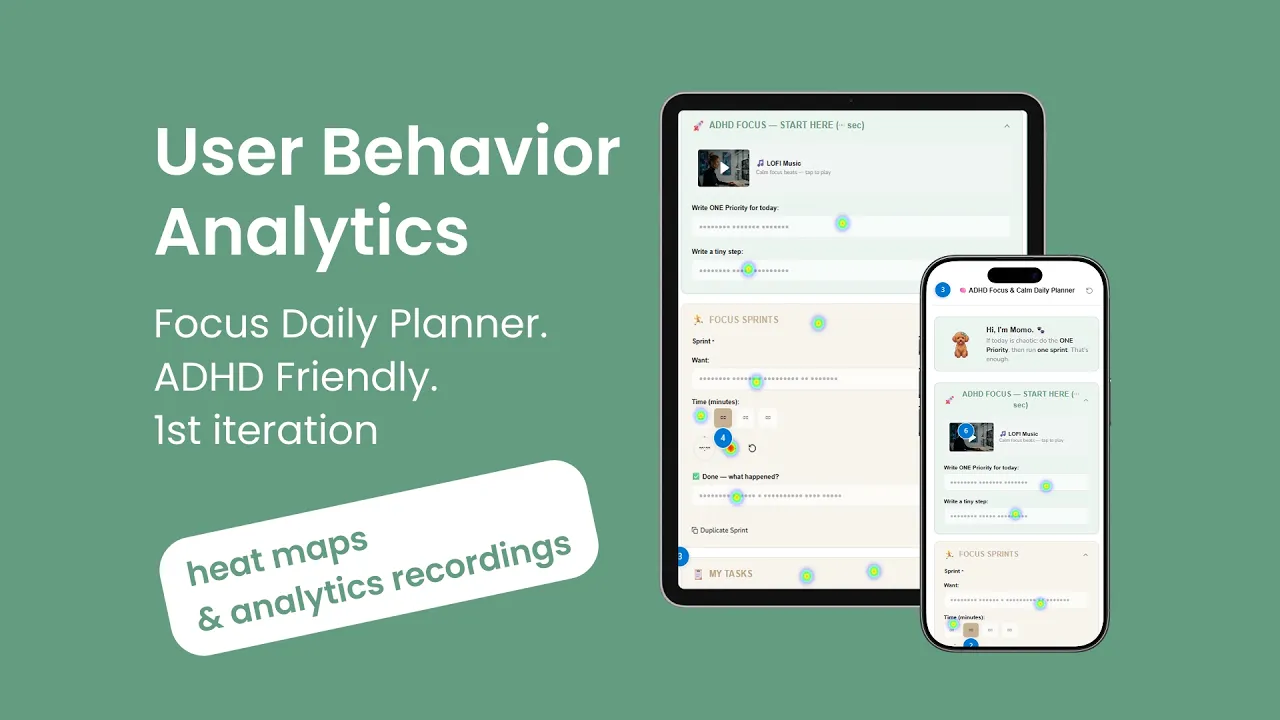
User Behavior Analitycs with Microsoft Clarity
Feedback from a small group of participants suggested that
the planner supported higher
productivity from 40-50 to 80%.
But after a few days, motivation to use it decreases.
Participants also noted that integrating Google Calendar would be a valuable improvement.


UX Research & Testable MVP
Productivity App
(Year)
2026
UX Research. Product design
Survey. AI iterations for testing. Microsoft Clarity Analytics
Goal
The goal was to create a planner prototype and test it with people who struggle to stay focused on completing tasks.
UX Reserch - Quantitative Analysis
Participants
The research included:
A busy engineer who uses a paper notebook and wants to get more tasks done.
A coach with ADHD who uses a paper notebook.
A UX designer who uses Google Calendar, a paper notebook, notes on her phone, and occasionally Notion.
A self-employed professional in the tourism industry who tends to be highly self-reflective.
Results
Iteration 1 — Paper planner
Digital Detox
Dopamine — checklists + reflection.
It can be printed and placed somewhere visible — on a wall, desk, or refrigerator — allowing people to plan their tasks while taking a break from digital devices.
1️⃣ Clear your mind
2️⃣ Start tasks more easily
3️⃣ Focus on the top 1-3 priorities
4️⃣ Track your energy and mood
5️⃣ Get a dopamine boost from checking tasks off
6️⃣ Release emotions and reduce stress
7️⃣ Close the day with reflection
Figma file
A small subset of participants completed tasks faster when using the planner.
However, most were not willing to continue using it because they already had a paper notebook they were familiar with and did not want to replace it.
Iterations 2–3 — MVP
The next iterations were digital MVPs built with Lovable/Claude and deployed on Netlify.
The results were similar. Participants reported that their productivity increased from approximately 40–50% to around 80% while using the planner.
However, most were still unlikely to replace their existing planning system with a new one.
In progress
User Needs & Experience Map
2-3rd versions. Web+mobile
Сreated with Lovable/Claude AI
In it, I added lo-fi music.
Some of the background videos were generated in Kling, and some were taken from free resources.
I would suggest customizing the app by allowing users to move blocks around and keep only the ones they need.
Iteration in Claude
New Features & Improvements
Task Reminders added
Ability to delete tasks
Kanban board implemented
Weekly reports available
Google Calendar potential integration
Voice dictation reminders for task lists
AI burnout prevention reminder: “10 tasks for today? Are you sure?”
Netlify
https://my-focus-planner.netlify.app/
Productivity AI Assistant added
Task button order was redesigned for clearer logic:
Start / In progress / Done,
Sprint / Pause,
Delete task.
Coach. Supportive or Realistic or Strict
Separate tabs:
Sleep tracker and habit tracker
Weekly calendar with tasks (important for psychologists, students, and business professionals)
Kanban board for users who prefer an IT-team–style workflow
Progress tracking for motivation
Smart Reminders
Barriers to Adoption
The planner largely duplicated functionality that participants already had in their existing planning tools.
There was no Google Calendar integration, which meant users could not see everything in one place.
Confirmed Engagement Drivers
Three features consistently encouraged engagement:
A task list that users could physically check off
Tracking the amount of water they drank during the day
Kanban board (for 1 of usrers)
Current Product Insight
At this stage, the planner looks more like a tool that people may use to address a spontaneous, immediate need for focus and productivity, rather than something they would adopt as a long-term planning system.
Long-term retention remains uncertain.
Hypothesis
AI could potentially increase long-term engagement through proactive assistance, reminders, habit formation, or an AI coach (partly implemented).
At the moment, the AI Coach is a separate MVP focused specifically on the value of communicating with an AI coach. Its combination with the planner has not yet been tested.
The next hypothesis to test is whether integrating the AI coach into the planner can transform it from a planning tool that duplicates existing workflows into an active productivity companion that users have a reason to return to regularly.
User Behavior Analitycs with Microsoft Clarity
Feedback from a small group of participants suggested that
the planner supported higher
productivity from 40-50 to 80%.
But after a few days, motivation to use it decreases.
Participants also noted that integrating Google Calendar would be a valuable improvement.
UX Research & Testable MVP
Productivity App
(Year)
2026
UX Research. Product design
Survey. AI iterations for testing. Microsoft Clarity Analytics
Goal
The goal was to create a planner prototype and test it with people who struggle to stay focused on completing tasks.
UX Reserch - Quantitative Analysis
Participants
The research included:
A busy engineer who uses a paper notebook and wants to get more tasks done.
A coach with ADHD who uses a paper notebook.
A UX designer who uses Google Calendar, a paper notebook, notes on her phone, and occasionally Notion.
A self-employed professional in the tourism industry who tends to be highly self-reflective.
Results
Iteration 1 — Paper planner
Digital Detox
Dopamine — checklists + reflection.
It can be printed and placed somewhere visible — on a wall, desk, or refrigerator — allowing people to plan their tasks while taking a break from digital devices.
1️⃣ Clear your mind
2️⃣ Start tasks more easily
3️⃣ Focus on the top 1-3 priorities
4️⃣ Track your energy and mood
5️⃣ Get a dopamine boost from checking tasks off
6️⃣ Release emotions and reduce stress
7️⃣ Close the day with reflection
Figma file
A small subset of participants completed tasks faster when using the planner.
However, most were not willing to continue using it because they already had a paper notebook they were familiar with and did not want to replace it.
Iterations 2–3 — MVP
The next iterations were digital MVPs built with Lovable/Claude and deployed on Netlify.
The results were similar. Participants reported that their productivity increased from approximately 40–50% to around 80% while using the planner.
However, most were still unlikely to replace their existing planning system with a new one.
In progress
User Needs & Experience Map
2-3rd versions. Web+mobile
Сreated with Lovable/Claude AI
In it, I added lo-fi music.
Some of the background videos were generated in Kling, and some were taken from free resources.
I would suggest customizing the app by allowing users to move blocks around and keep only the ones they need.
Iteration in Claude
New Features & Improvements
Task Reminders added
Ability to delete tasks
Kanban board implemented
Weekly reports available
Google Calendar potential integration
Voice dictation reminders for task lists
AI burnout prevention reminder: “10 tasks for today? Are you sure?”
Netlify
https://my-focus-planner.netlify.app/
Productivity AI Assistant added
Task button order was redesigned for clearer logic:
Start / In progress / Done,
Sprint / Pause,
Delete task.
Coach. Supportive or Realistic or Strict
Separate tabs:
Sleep tracker and habit tracker
Weekly calendar with tasks (important for psychologists, students, and business professionals)
Kanban board for users who prefer an IT-team–style workflow
Progress tracking for motivation
Smart Reminders
Barriers to Adoption
The planner largely duplicated functionality that participants already had in their existing planning tools.
There was no Google Calendar integration, which meant users could not see everything in one place.
Confirmed Engagement Drivers
Three features consistently encouraged engagement:
A task list that users could physically check off
Tracking the amount of water they drank during the day
Kanban board (for 1 of usrers)
Current Product Insight
At this stage, the planner looks more like a tool that people may use to address a spontaneous, immediate need for focus and productivity, rather than something they would adopt as a long-term planning system.
Long-term retention remains uncertain.
Hypothesis
AI could potentially increase long-term engagement through proactive assistance, reminders, habit formation, or an AI coach (partly implemented).
At the moment, the AI Coach is a separate MVP focused specifically on the value of communicating with an AI coach. Its combination with the planner has not yet been tested.
The next hypothesis to test is whether integrating the AI coach into the planner can transform it from a planning tool that duplicates existing workflows into an active productivity companion that users have a reason to return to regularly.
User Behavior Analitycs with Microsoft Clarity
Feedback from a small group of participants suggested that
the planner supported higher
productivity from 40-50 to 80%.
But after a few days, motivation to use it decreases.
Participants also noted that integrating Google Calendar would be a valuable improvement.